





Custom business booklet designed to inform and impress.
- Premium paper stock and special finishes
- Print as few as 8 pages and up to 96 pages
- Choose from various standard sizes
- Same-day printing available


Booklet Printing for a Detailed Brand Storytelling
Turn every page into a powerful marketing opportunity with custom booklets. Use them for in-depth brand storytelling or professional presentation of products or services.
Common Uses of Custom Booklets
- Product Catalogs. Use high-quality images to entice customers to engage with your brand or buy your products.
- Event Guides. Distribute these at trade shows, conferences, and other similar events as an aid to a better customer experience.
- Training and Onboarding. Equip new customers and staff with helpful, relevant information.
- Direct Mail and Sales Kit. Leave a tangible reminder after a client meeting.
- Corporate Profiles. Introduce your brand’s mission, values, and team.
Popular Booklet Sizes
Booklets are available in various standard sizes, from large product catalogs with captivating visuals to pocket-sized guides that are easy to distribute. Choose a format based on your design, purpose, and usage requirements.
Popular Booklet Sizes and Their Ideal Uses
- 8.5" x 11" or Letter Size. The most common and versatile size, it is ideal for corporate reports, product or service catalogs, and manuals.
- 5.5" x 8.5" or Half-Letter. Its compact size is ideal for event programs, promotional materials, and handbooks for students and employees.
- 6" x 9" . It is the go-to size if you want your booklets to have a professional, “bookstore” feel. Standard notebooks, novels, and journals typically follow this format.
Booklet Printing With Premium Paper Stock
Our booklets are printed on premium paper stock to ensure superior visual impact and enhance brand perception. They are durable and feel “substantial” when touched.
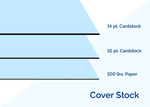
Choose among the following cover stock, arranged from the sturdiest option to the most lightweight and affordable:
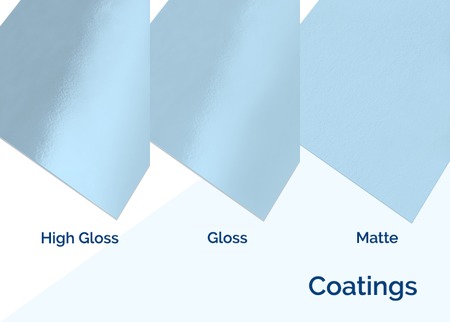
14 pt. Matte Cardstock
- Durability protects it from folding and bending
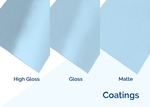
- Matte coating gives colors an elegant, soft, muted color
14 pt. Gloss Cardstock
- Cardstock’s durability keeps your cover looking good as new
- Gloss coating allows colors to pop out from afar
14 pt. High Gloss UV Cardstock
- Sturdy cardstock comes with double the shine
- Colors appear extra vibrant
14 pt. Uncoated Cardstock
- A sturdy cardstock that doesn’t easily bend or fold
- Uncoated texture allows for writability with a pen or marker on both sides
10 pt. Gloss Cardstock
- Slightly thicker than the 100 lb. paper
- Lightweight cardstock brings out the brightness of your cover’s colors
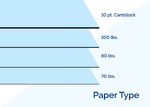
100 lb. Gloss Paper
- Fine-textured paper that’s sturdier than magazine paper
- Gloss coating prints your design in vivid colors and adds an extra shine
Inside pages can be printed on extra-thick 100 lb. paper, but other sturdy and lightweight options are also available:
70 lb. Paper Uncoated
- A thin, lightweight paper stock that’s easy to carry around
- Smooth writable surface
80 lb. Paper
- A little thicker and sturdier than the 70 lb. paper
- Shiny gloss or elegant matte coating on both sides
Keep It Compact or Cover Multiple Angles
You can print as little as eight pages (compact) in a custom booklet, but you can also choose to print between 16, 20, 24, 36, and up to 96 pages. All available page counts are divisible by 4.
The total number of booklet pages comes from the cover and inside pages. All booklets come with four cover pages, two for the front and two for the back. Each cover page has an outside cover and an inside cover. Take all these sections into account when planning the pages in your booklets.
.jpg)
Two Sturdy Binding Options to Hold It Together
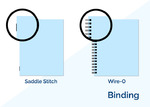
Saddle stitching and Wire-O binding secure all pages in your booklets. Select what suits the number of pages and the final appearance of your design:
- The saddle stitching method is recommended for 8- to 12-page booklets with lightweight paper for the inside pages. It uses two staples to bind all the pages on the folded spine.
- Wire-O binding has closed wire loops going through each hole in the inside pages and cover. It is unlike spiral binding, where only one continuous wire goes around the holes. We recommend Wire-O for thicker booklets (16 pages and up).
Create and Order Custom Booklets at Your Convenience
Upload a print-ready file. Is your booklet design ready for printing? Select “Upload Now” after indicating your booklet’s specifications on the Online Calculator. On the page, upload the file in any of the following formats: TIF, TIFF, INDD, ZIP, and SIT files.
Download a layout template in your preferred file format and size. Head to the “Layout Templates” tab and choose the size you need. After clicking the ZIP icon of your selected size, a folder containing all the file formats will download to your device. All files show the printing guidelines that ensure your artwork is formatted correctly before production.
Have questions about booklet printing? Contact our experts any time from 6 a.m. to 10 p.m. CT, Mondays to Fridays, or from 8 am to 7 p.m. CT on weekends.
Booklet Printing FAQs
You can print a minimum of eight pages or up to 96 pages. All available page numbers are divisible by four, as the count includes the cover and back sections.
The standard size for booklets is 8.5” x 11” or letter size. The 4.75” x 4.75” works for concise content and a handier size.
Yes, you can send us a PDF of your booklet file. Select Upload Now on the online calculator, and you can easily upload a file from your computer or Dropbox account.
We also offer layout templates you can download based on your preferred binding option and location. Go to the Layout Templates tab, select your binding, and download the size you need.
Yes, you can request an online PDF proof after uploading your file. The PDF proof is available for download on the Shopping Cart or from “My Account” after checkout. We will not print your design until you’ve approved the PDF online.
You can select same-day or one-business-day printing for your order. Note that this covers the production time of your booklet. It does not include shipping transit time or direct mail processing time. All turnaround times are based on business days and exclude national holidays.
The four cover pages include:
- Outside front cover or where your cover photo is located
- Inside front cover or the back of the cover page
- Inside back cover or the area behind the back cover
- Outside back cover or the last exterior page of your booklet
The total number of pages includes the covers. So, the front cover is page 1, the inside front cover is page 2, and so on.
This is the side where the pages are joined together using wires or staples. In booklet printing, you can either choose left binding or top binding.
Left binding is suitable for most booklets because it allows for a natural, left-to-right reading experience. Top binding is best reserved for landscape-oriented designs and flip-up calendars.
