Brochures in CMYK Explained

Brochure Details:

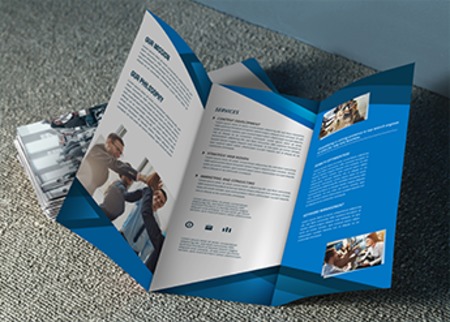
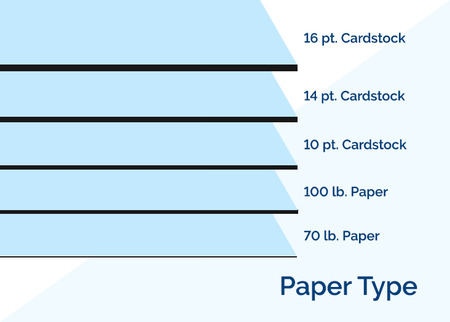
  • Five paper stock choices
  • Nine standard brochure sizes or trim to custom size
  • Pricing includes full bleeds
  • Eight brochure folding options (not all stocks and sizes are compatible with each folding option).
  • 4 color printing on both sides, or one side only

Have questions? Contact our customer service department via phone, instant chat, or email. Or enlist our art check services to make sure that your file is uploaded correctly and meets important brochure printing guidelines. Our design experts will always be happy to help you receive the full benefits of brochures printed in CMYK.


Follow the specifications provided to ensure your artwork prints correctly. Our templates are provided as a ZIP files and include PDF, AI, and JPG versions of each template.

Select a ZIP file to download

Flat Template
 5.5x4.25
Click Here to Download  
8.5x5.5 Click Here to Download   
11x4.25 Click Here to Download  
11x8.5 Click Here to Download  
9x12 Click Here to Download  
14x8.5 Click Here to Download  
17x11 Click Here to Download  
25.375x11 Click Here to Download  
33.75x11 Click Here to Download  
Half Fold Template
5.5x8.5 Click Here to Download  
4.25x11 Click Here to Download  
11x8.5 Click Here to Download  
9x12 Click Here to Download  
14x8.5 Click Here to Download  
17x11 Click Here to Download  
25.375x11 Click Here to Download  
33.75x11 Click Here to Download  
Tri (Letter) Fold Template
11x8.5 Click Here to Download  
9x12 Click Here to Download  
14x8.5 Click Here to Download  
17x11 Click Here to Download  
25.375x11 Click Here to Download  
Gate Fold (3 Panels) Template
11x8.5 Click Here to Download  
9x12 Click Here to Download  
14x8.5 Click Here to Download  
17x11 Click Here to Download  
25.375x11 Click Here to Download  
33.75x11 Click Here to Download  
Double Gate Fold (4 Panels) Template
11x8.5 Click Here to Download  
9x12 Click Here to Download  
14x8.5 Click Here to Download  
17x11 Click Here to Download  
25.375x11 Click Here to Download  
33.75x11 Click Here to Download  
Z Fold Template
11x8.5 Click Here to Download  
9x12 Click Here to Download  
14x8.5 Click Here to Download  
17x11 Click Here to Download  
25.375x11 Click Here to Download  
33.75x11 Click Here to Download  
Accordion Fold Template
11x8.5 Click Here to Download  
9x12 Click Here to Download  
14x8.5 Click Here to Download  
17x11 Click Here to Download  
25.375x11 Click Here to Download  
33.75x11 Click Here to Download  
Roll Fold (4 Panels) Template
11x8.5 Click Here to Download  
9x12 Click Here to Download  
14x8.5 Click Here to Download  
17x11 Click Here to Download  
25.375x11 Click Here to Download  
33.75x11 Click Here to Download  
Double Parallel Fold Template
11x8.5 Click Here to Download  
9x12 Click Here to Download  
14x8.5 Click Here to Download  
17x11 Click Here to Download  
25.375x11 Click Here to Download  
33.75x11 Click Here to Download  
French Fold Template
11x8.5 Click Here to Download  
9x12 Click Here to Download  
14x8.5 Click Here to Download  
17x11 Click Here to Download  
25.375x11 Click Here to Download  
33.75x11 Click Here to Download  

Be sure to DELETE "template layer" before you submit your files.

View templates for all products click here.
Click here for guided instructions.

Brochures in CMYK Explained

One of the most common mistakes made in brochure printing is to send your printing company a design containing RGB colors. Although this mistake is not detrimental to your design, you are certain to receive different hues of colors than you may have been expecting. Professional printing companies use the CMYK color model rather than the web designer's RGB color model so that the colors in your brochures look brilliant. Here's why:

CMYK vs. RGB

In short, CMYK and RGB can be seen as two different color languages. RGB is the language for screen displays, since red, green, and blue are the primary colors of light. Web designers use RGB colors because of the richness in tone these colors produce on screen. CMYK is the language for print, since cyan, magenta, and yellow are the primary colors of ink. Although C, M, and Y can produce black when mixed, Black, or Key, is a part of the CMYK color model for two main reasons: to create a richer black and to prevent the need to oversoak the paper by including too many layers of cyan, magenta, and yellow. To create the right blend of colors on your printed brochures, a plate is created for each color and each image ensuring much more accurate and quality results.

Conversion Considerations

The RGB colors have a wider range of colors simply because there is a limit to how many colors can be mixed using ink (i.e. the CMYK model). This can provide problems when trying to convert an RGB color design to CMYK. There's also the problem of "seeing" the correct CMYK shades on your screen. What is printed will be different than what appears on screen. But there are solutions. Here are some ideas for getting better color results on your printed brochures:

  • Design in RGB, flatten the image, and then convert to CMYK. Since CMYK produces a more muted look, you may want to play around with the saturation or texture, and then flatten it one more time before sending to print.
  • Design in CMYK. To do this, though, you will need to calibrate your monitor for print, and even after you monitor is calibrated, what you see on your screen may appear slightly different than what gets printed. Using a color swatch to choose CMYK colors is your best bet for accurate hues.
  • Design in RGB and let your printer to the conversion for you. This may cost you extra, though, and sometimes a printing company may not even offer this solution. Sending a color chart along with your design will help the printer more accurately convert your colors, but making the conversion yourself allows you to sharpen the image to get the exact look you desire.

There really is no "perfect" solution for converting RGB to CMYK, but fortunately by following one of the options above, you'll get close enough. Just remember, a customer is only going to see the final result, so just as long as the colors in your brochure look brilliant, your clients are not going to care if the colors are just a shade off from your desired results.

Online PrintingBrochure Printing > Full Color Brochures > Brochures in CMYK Explained

Instant Pricing
$162.50
Standard Options
Size (?)
Paper Type (?)
Quantity (?)
Printing (?)
Turnaround (?)
Proof (?)
Finishing Options
Front Finish (?)
Back Finish (?)
Folding (?)
Hole Drilling (?)
Hole Drilling Location (?)
Perforating (?)
Scoring (?)
Shrink Wrapping (?)
  sets of:  
Tabs (?)
Custom Size
Custom Trim?  Height:  Width:
$162.50
(
$0.65 each)
  • 1. Pick a product
  • 2. Payment
  • 3. Upload artwork
  • 4. Review & Send to Press
Call us at 877.405.3949