
Give us a call M-F (6am-10pm CT), Sat-Sun (8am-7pm CT)

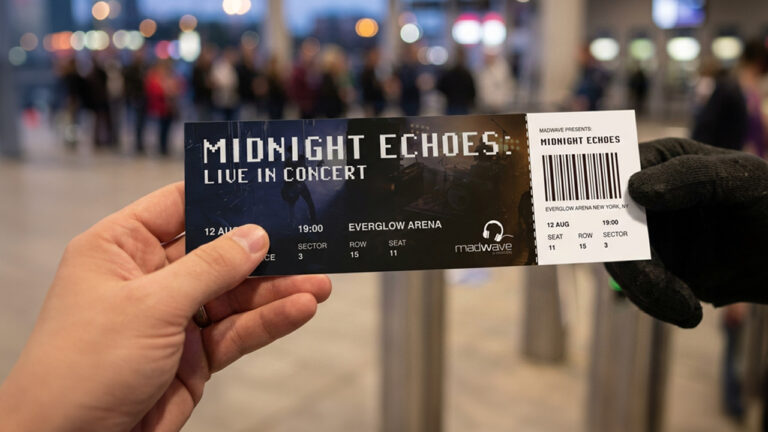
Event tickets play a key operational role in any event, from tracking sales and attendance to managing crowds and preventing fraud and duplication. Physical tickets can also serve as keepsakes for attendees and promote brands or sponsors.
This comprehensive checklist can help you create tickets that are secure, functional, and professional, and avoid costly mistakes, such as fraud and admission issues.
Before jumping into design, you need to define what your tickets are meant to accomplish.
Questions to Ask Yourself:
Tickets are a critical touchpoint in the attendee’s experience, so they must clearly and accurately communicate key details. Missing or unclear information can create confusion, delays, inefficient tracking and planning, and other issues.
At a minimum, your ticket should include these key details:
Event name and branding (e.g., logos, colors, and typography)
Date and time
Venue name and address
Seat number or section
Ticket type (e.g., VIP and general admission)
Entry instructions (gates and time windows)
Terms and conditions (refund policy and restrictions)
Contact details for support
Tracking tickets is critical for sales, logistics, admission control, and fraud prevention.
Key identification features in most ticket designs:
Unique serial numbers
Barcodes or QR codes for scanning (test before printing)
Ticket data that matches your registration system (review and test before printing)
There are several options for getting barcodes for event tickets, depending on how simple or advanced you want your setup to be.
In most cases, free online tools (e.g., https://barcode.tec-it.com) are sufficient for small events, though they typically lack automatic scanning, meaning they only generate codes but don’t manage them. As a result, you need to create your own system to track and log scans.
For medium and large events, popular ticketing platforms like Eventbrite and Peatix are better options, as they generate unique barcodes and provide scanning apps for entry.
Ticket fraud and duplication lead to revenue loss and security risks. In general, the level of security should match the scale and value of your event, so for high-demand events, a good rule of thumb is to combine 4-7 security features.
On the other hand, simple or low-risk events may only need one or two security features for the tickets.
Holograms or foil stamps
Unique serial numbers for each ticket
QR codes or barcodes for verification
Watermarks or microtext
Perforations or tear-off stubs to prevent reuse
UV ink or invisible ink marks
Custom barcodes tied to a database
Make it visually appealing. Your ticket represents your brand, making it critical to use consistent branding elements like fonts, colors, and logos. Also, include high-quality graphics to give your event a more professional and credible image.
Ensure readability. Choose legible fonts, maintain strong contrast between text and background, and avoid cluttered layouts and too many decorative elements.
Plan the layout carefully. Include proper margins and bleed areas to prevent important elements from being cut off. Furthermore, decide on orientation (portrait or landscape) based on your design and scanning needs.
Choose the right materials. Your ticket’s durability and how people perceive it will depend on the material and finish. Standard paper works for short-term events, while thicker cardstock or waterproof materials may be necessary for outdoor or premium events.
Use the correct color code. Always design in CMYK color mode for printing. Designs created in RGB may appear vibrant on screen but may result in inaccurate colors when printed.
Check resolution and quality. Ensure all images are high resolution (at least 300 dpi) to prevent blurry graphics or pixelated barcodes that may lead to scanning errors.
The ideal number of printed tickets depends not only on the venue’s capacity and expected attendance. The general recommendation is to include a buffer (around 5-10% of the expected attendance) for errors, replacements, or last-minute sales.
With buffer planning, you can avoid last-minute panic or rushed, expensive reprints.
Skipping proofing is one of the most common and costly mistakes. Even a small typo or an unscannable barcode can invalidate thousands of tickets if not caught early.
Do these things before ticket printing:
Review all text for errors (dates, schedules, names, spelling, etc.)
Double-check layout alignment and spacing
Print a physical proof to verify colors and size
Test QR codes or barcodes to ensure scannability
Get stakeholder approval before final print
Integrating printed tickets with digital systems, such as QR codes, barcodes, or online validation, offers countless benefits, including efficient data tracking, enhanced security, and improved customer experience.
Use this checklist to make your printed ticket “smarter.”
Enable QR code check-ins
Sync with event management software
Offer digital backup tickets
Provide clear instructions for attendees
Before sending to print, make sure your ticket meets these requirements:
All event details are accurate
Design is clean and readable
Security features are included
Codes are tested and working
Print specs meet professional standards
Proofs are approved
A well-designed ticket is more than a piece of paper for admission. It is a tool for creating a seamless experience for both organizers and attendees. This checklist can help you avoid common design pitfalls and costly reprints.
PrintPlace provides custom ticket printing for events like concerts, raffles, parties, and conventions. We offer extensive customization options, including various standard sizes, finishes like gloss and matte, perforation for easy stub tearing, and a sequential numbering system for tracking tickets.
PrintPlace’s mission is to provide customers with unparalleled printing services through the knowledge and expertise of its employees.