Reviews
4.3
Out of 5.0
  • 5 Star
    (283)
  • 4 Star
    (32)
  • 3 Star
    (21)
  • 2 Star
    (17)
  • 1 Star
    (33)
Overall Rating
82%
of customers that buy this product give it a 4 or 5-Star rating.
Verified buyer
I’m really happy with these stickers . I recommend them if you want to promote your business. March 27, 2026 by carlos hernandez ( MN )
“The stickers and prices are amazing! The best price !”
Verified buyer
Excellent quality. Really fast and good price. March 27, 2026 by Laura Canelos ( KS )
“Excellent quality. Really fast and good price.”
Verified buyer
March 22, 2026 by DP ( VA )
“good quality printing, but took too long to receive a simple order, and their shipping cost was very high.”
Verified buyer
March 21, 2026 by Sarah Nath-Varma ( TX )
“I haven't put the stickers on the bottles yet, but they do look lovely when they came. I wish I could get them closer to $1 per sticker, but I will have to invest in a larger quantity. Working with your company is great, the representatives are super friendly and so helpful! Thank you! Sarah R”
Verified buyer
March 20, 2026 by Cynthia Lombardy ( NJ )
“Very easy process. Love the stickers.”

Update Your Packaging and Promotions With Custom Stickers


Upgrade your seasonal packaging or product launch promotions with custom stickers. Create a design personalized to your brand and speaks to your target audience. Find the exact shape, size, and material that matches your vision, along with the most practical format for faster application.

Find the Best Format for Your Custom Stickers


Format

Singles

Roll

Sheet

Kiss Cut

Definition

Individual pieces

Bulk quantities of stickers spun around a cardboard spool

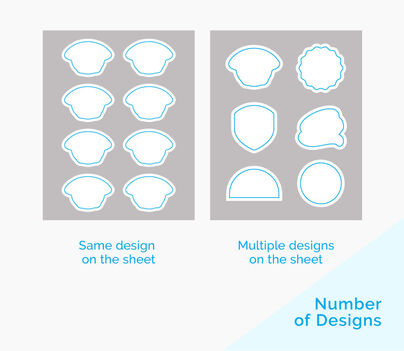
Several copies of different or the same sticker design printed on one sheet

One sticker design printed on a backing sheet

Best For

Standard shapes like oval, circle, square or rectangle; typically applied by hand.

Large volume of stickers for application using an automatic label dispenser

Giveaways of various sticker designs

Die-cut shapes that need the edges protected before application

Keep Your Sticker Good as New with Sturdy Materials and Protective Finishes


Depending on your chosen format, several durable materials are available to protect your design from water, outdoor or indoor elements, and other external factors.

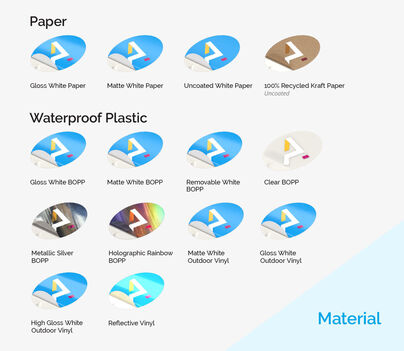
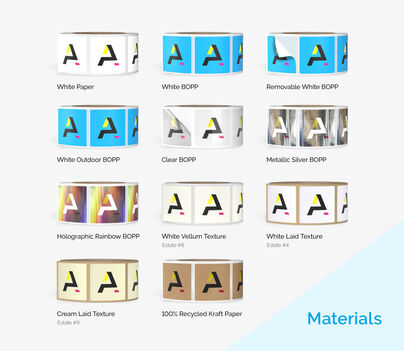
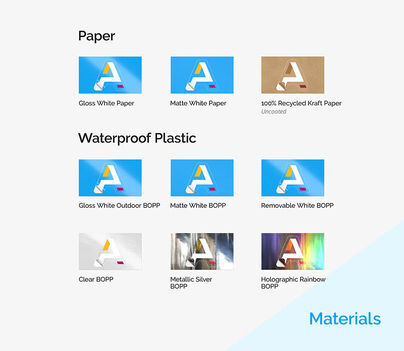
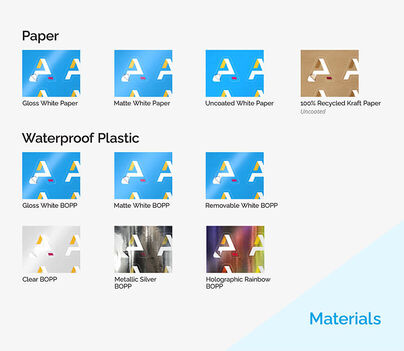
  • White paper sticker is typically used for labels or decorations that stay indoors—offered for all four sticker formats.
  • White vinyl paper is waterproof and protects the sticker design from fading thanks to its UV coating. Offered for singles, sheets, or kiss-cut stickers.
  • BOPP’s water resistance makes it the go-to for refrigerated bottles or containers. Available only for the roll format.
  • The textured estate is generally seen on wine bottles; it maintains the sticker design’s look for a few hours submerged in ice water or refrigerated.

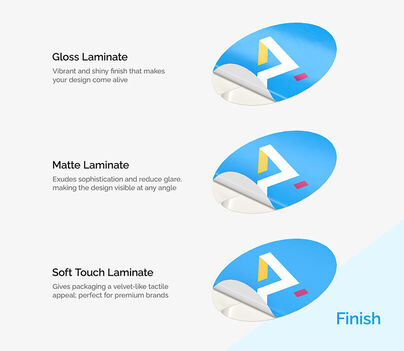
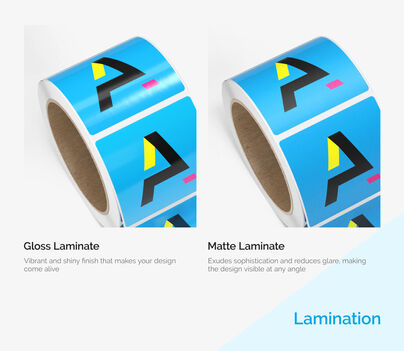
Give your sticker additional protection and elevate its look with matte, gloss, or high gloss UV laminate. These are available under specific materials after selecting your preferred one on the online calculator:

  • The matte coating has a smooth, subdued finish for neutral colors.
  • Gloss gives bright or bold colors an extra pop.
  • High gloss offers the most brilliant shine and stands out from afar.

3 Ways to Customize Your Stickers


Design It Online

  1. Select “Design Online” on the Online Calculator.
  2. The Online Design Tool will load with a blank canvas in your selected shape and size.
  3. Upload images, edit text, and combine colors to complete your design.

Download a Blank Template

  1. Head to the “Layout Templates” tab.
  2. Expand the template headers, then select your preferred size.
  3. The ZIP file will download to your device.
  4. Open the folder and choose your preferred file format based on your editing program. Options include EPS, PDF, JPG, AI, or PSD.

Upload a Print-Ready File

  1. Have a file on hand? Choose “Upload Now after completing the Online Calculator.
  2. You’ll be taken to the “Upload Your Design” page, where you can send a PDF, JPEG, JPG, PNG, TIF, TIFF, or EPS directly to the site.
  3. After attaching your file in the recommended format, select “I need a PDF proof” so you can view the file for any changes and approve it online for production.

Have questions about our printing services? Call us today and our experts will gladly answer all your questions. You can reach them at 877-405-3949 from Mondays to Fridays, 6am to 10pm CT, Saturdays and Sundays 8am to 7pm CT or through Live Chat if you need real-time explanations on our custom printing.


Custom Stickers FAQs

What if my design does not pass the printing guidelines and requirements?

If your design does not meet the printing requirements, our team will communicate the concern and discuss how we can remedy the file.
Note that any additional changes will cause a delay in the turnaround time. To ensure that your file meets all printing guidelines, download a template and create your design on that file. Review the file for the following before submitting or uploading it on the site:

  • The color tone is in CMYK
  • Resolution is at least 300 dpi
  • The printed design follows the bleed, trim, and caution lines


Which sticker material is waterproof?

White vinyl sticker is the most durable and only waterproof material.


What format should I submit the file in?

We accept files in the following formats: PDF, EPS, PUB, PSD, JPG, JPEG, or TIF.


What is the smallest size available for custom stickers?

The smallest size depends on the format you select:

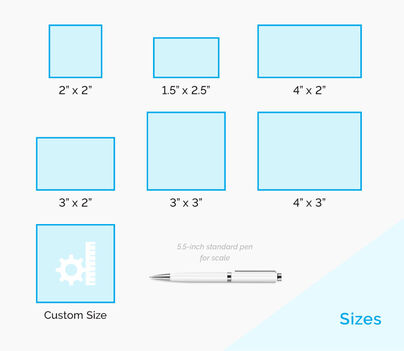
  • Singles: 1.5” x 2.5”
  • Roll: 0.5” x 1”
  • Sheet: 4” x 6”
  • Kiss-Cut: 2”x 2”


Which sticker material can I write on?

Uncoated white paper stickers have a writable surface. This material is popular for stickers used on delivered packages or envelopes.


Will the sticker leave damage on the surface it’s applied on?

Since all materials are permanent adhesives, they will leave a residue or mark once removed.


If I need a large order, should I order roll or sticker singles?

We recommend the roll stickers for large quantity orders. Roll stickers are easier to apply quickly whether done manually or using a label dispenser. Sticker singles are more suitable for small orders starting at 25 pieces, letting you hand them out easily or insert them in your packages.


How much does a custom sticker cost?

The cost will depend on the quantity, size, shape, material, and finish of your sticker. After inputting your specs, the online calculator will load the total price and unit cost for each piece. Note that the price increases with a faster production time and other advanced options such as rounded corners or a custom trim.


What is the difference between the BOPP materials and white sticker paper?

BOPP materials (clear, white, and metallic plastics) are used on items such as beer, water, and wine bottles. These work best for indoor use on items that require refrigeration, making them water- and oil-resistant. None of them can be written on with a standard marker or pen.

White sticker paper is used for indoor products that won’t be exposed to water or other outdoor elements. This material is also not writable.

Both paper and BOPP materials come with either gloss or matte laminate.


How many stickers are printed in one roll?

The number of stickers per roll depends on your chosen size and shape. The average measurement per roll is at 3” in diameter. You may contact our printing experts if you need a specific number of stickers per roll.


What does the unwind direction for a custom roll sticker indicate?

The unwind direction determines where your artwork will be printed on each roll sticker. It also shows the direction from which the stickers will unwind from the core. The direction is indicated according to the copy on your custom sticker printing design:

  • Top of copy
  • Bottom of copy
  • Right of copy
  • Left of copy


How do I ensure my sticker prints at the correct position?

Our design templates include margins, trim lines, and safe areas to ensure everything lines up correctly. Take advantage of these guides by organizing all important elements like text, logos, and images at least 1/8" inside the safe zone. We also recommend asking for a proof upon sending your design draft and review it carefully. If your proof is centered, your final prints will be centered too.


How do I avoid making sticker borders look uneven when trimmed?

Slight cutting shifts are common in printing, and this may result in uneven and crooked borders. To minimize this, make borders at least 1/8" thick and place them slightly inside the trim line. Avoid making borders too thin or placing them too close to the edge of your design.


How do I print stickers so the colors match what's on screen?

Convert your design file from RGB to CMYK color mode before printing. Most design programs use RGB by default to suit digital images. Switch to CMYK and tweak the colors so your designs look their best in print.

Note that factors like printer type, monitor calibration, and custom finish may affect your stickers’ colors. Always request a proof before going into full production to ensure you’re satisfied with the result.


What should I do to match the stickers’ colors from an earlier print run?

If you want your new order to match previous colors, please reach out to us at 877-405-3949 or email us at customerservice@printplace.com with your order details. We will use the same color settings and printing facility to keep things consistent.


Can I use the stickers for different surfaces? Will they work both indoors and outdoors?

Yes, on both accounts. Our stickers use the standard permanent acrylic adhesive that sticks to most smooth surfaces. They are also weather-resistant and can be used indoors and outdoors.


Custom Sticker Layout Templates

Use our custom sticker layout templates to ensure your artwork and designs are sized and formatted correctly. PrintPlace layout templates can be downloaded for each custom sticker size below, in an EPS, PDF, or JPG format for Illustrator or Photoshop.


View Sticker Singles or Roll Stickers Layout Templates

Need help with our layout templates?

Please refer to our guided layout instructions.

{{tatDisplay}}
{{ priceData.discounted_price | currency : '$' : 2 }} {{ priceData.price | currency : '$' : 2 }}
{{ priceData.unit_price | currency : '$' : 2 }} each